Running chartlbi
running-prettylbi.Rmd1. Install chartlbi
To run this vignette, chartlbi must be installed in an R
library.
# devtools::install_github("d2gex/chartlbi")2. Read the example data
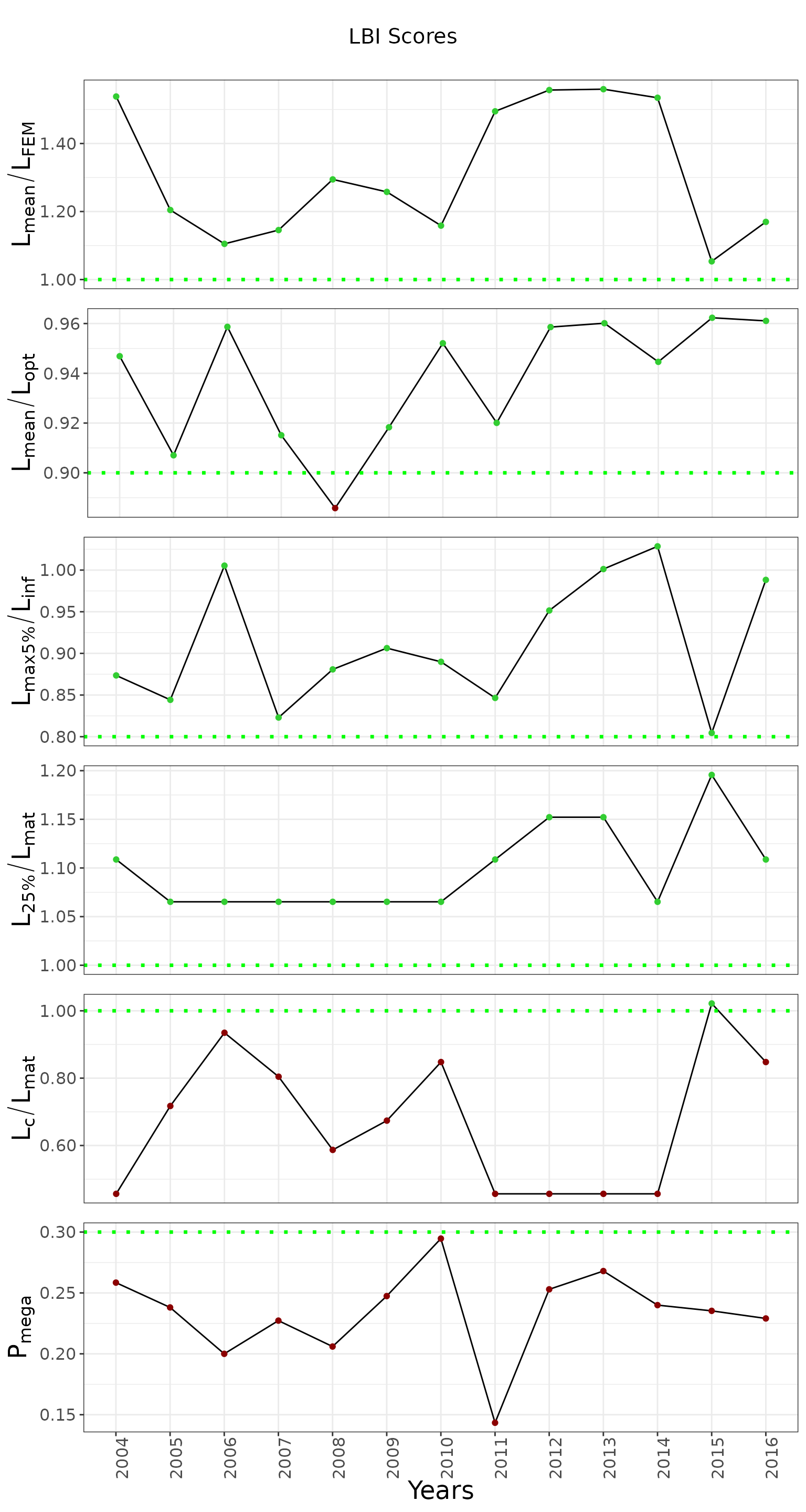
This example uses a synthetic length-frequency matrix for a demersal fish from the northern Iberian Peninsula. The time series covers 2004 to 2016. The next chunk reads the matrix and shows its first rows.
length_freq_matrix <- readRDS("data/demersal_fish_sample.rds")
head(length_freq_matrix)
#>   MeanLength X2004 X2005 X2006 X2007 X2008 X2009 X2010 X2011 X2012 X2013 X2014
#> 1       10.5     1     0     1     0     1     0     1     1     1     1     1
#> 2       11.5     1     0     1     0     1     0     1     1     1     1     1
#> 3       12.5     1     0     1     0     1     0     1     1     1     1     1
#> 4       13.5     1     0     1     0    26     0     1     1     1     1     1
#> 5       14.5     1     0     1     0    26     0     1     1     1     1     1
#> 6       15.5     0     0     1     0    26     1     1     1     1     1     1
#>   X2015 X2016
#> 1     0     1
#> 2     0     1
#> 3     0     1
#> 4     0     1
#> 5     0     1
#> 6     0     1
3. Run chartlbi
To create the chart, provide:
- A length-frequency matrix and the biological parameters needed by the LBI algorithm.
- A plotting context. The defaults are suitable for a first plot.
- Reference thresholds for the LBI indicators. The package provides defaults.
- The order in which indicators should appear, from bottom to top.
# (1) Define biological inputs and length-class width
params <- list(
  binwidth = 1,
  linf = 49.1,
  l50 = 23
)


# (2) Define the plotting context. PlotContext$new() provides defaults that can be changed as needed.
stack_plot_context <- chartlbi::PlotContext$new()

# (3) Use the default thresholds for the LBI indicators.
thresholds <- chartlbi::Thresholds

# (4) Define the indicator order, from bottom to top.
column_order <- list('Pmega', 'Lc_Lmat', 'L25_Lmat', 'Lmax5_Linf', 'Lmean_Lopt', 'Lmean_Lfem')

# (5) Run the LBI algorithm.
lbi <- chartlbi::LbiAlgo$new(length_freq_matrix, params)
results <- lbi$run()

# (6) Build the plot.
lbi_plotter <- chartlbi::OutputPlotter$new(results, stack_plot_context, thresholds)
graph <- lbi_plotter$build_plots(column_order)
graph